Select Settings on the main menu to open the Settings menu.
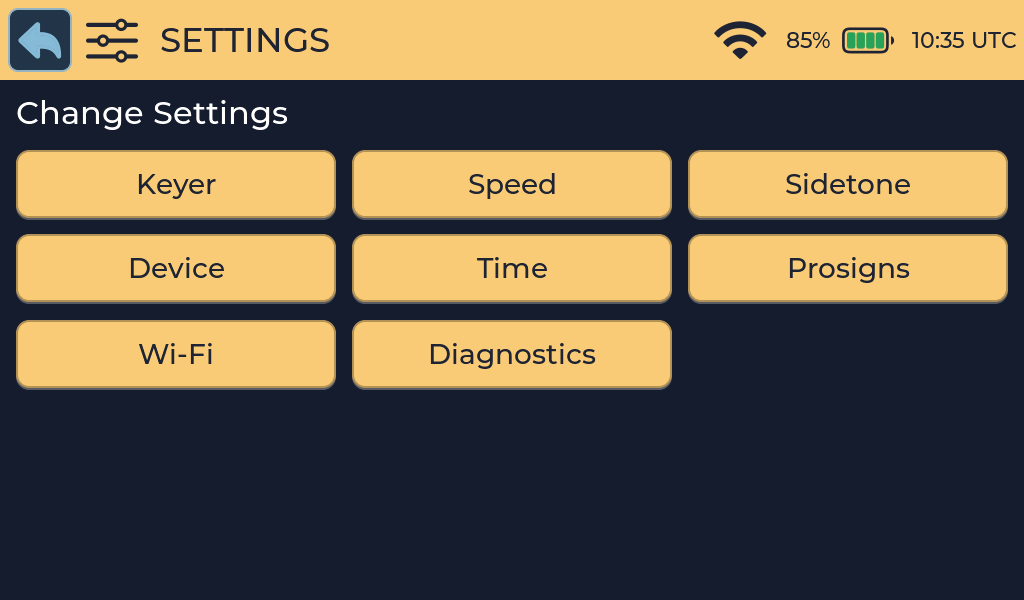
| Menu item | What it controls | Manual page |
|---|---|---|
| Keyer | What is connected to each key input | Keyer and key inputs |
| Speed | Character Speed, Farnsworth Speed, extra word spacing | Speed and timing |
| Sidetone | Tone preset and pitch | Sidetone and audio |
| Device | Brightness, volume, startup animation, advanced features | Display and system |
| Time | Time zone, automatic synchronization and manual time | Time |
| Prosigns | How prosigns are decoded and shown | Prosigns |
| Wi-Fi | Wireless networks | Wi-Fi |
| Diagnostics | Hardware service tests | Display and system |
Spoken answers are set inside the activities that use them. See Spoken answers. Diagnostics contains hardware service tests; see Display and system.
Saving and cancelling
- Change the values on the screen by touch or with the rotary encoder.
- Select the checkmark in the title bar to save, or the cross to cancel.
- A Saved or Cancelled message appears and you return to the Settings menu.
Saved settings are kept when Morse Scout is turned off and through normal firmware updates. Cancel leaves your previous settings unchanged.
With the rotary encoder: turn to change the highlighted value, press briefly to move to the next row, and press and hold for about a second to save and leave.